The harness · how every run works
The world pauses while you think.
Frame-exact control, a game clock that freezes while the run clock keeps counting, and an agent that gets coached for the job. This page is the machine every run passes through, with the agent's own briefing quoted word for word.
This measures how far agents can get with TAS controls, decompiled code, walkthroughs, deep observability, and everything else I could hand them. I wanted to know what's possible, not what's possible under limits.
The starting problem
Why agents can't just "play"
A coding agent can't watch video. It can't see motion at all. It gets still images, one at a time, out of real time, and it might spend thirty seconds thinking between two of them. Point one at a Nintendo 64 game running at sixty frames per second and it's blind in exactly the way that matters: by the time it has decided what to do about a frame, the game has moved on without it.
Earlier real-time benchmarks show what happens next: agents die over and over to the first enemy because inference latency eats the reaction window. That's a real finding about real-time perception. It just isn't the question I wanted to ask.
The core design
The game only moves when the agent says so.
The harness boots paused at frame 0. Thinking costs zero game time: no frames advance while the agent deliberates. But the run's wall clock keeps counting while the game is frozen; it measures every reported finish and the 90-minute cap.
One screenshot can’t tell you which way Mario is moving.
The next two observations show it: he was falling. The agent can advance a few frames, look again, and pause before choosing its next input.
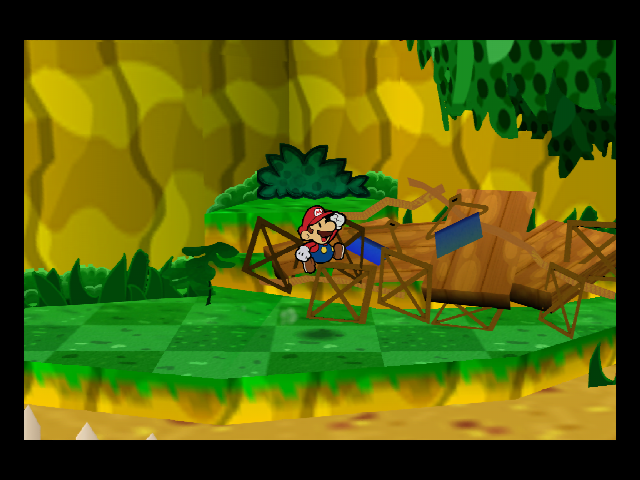
One still, mid-air
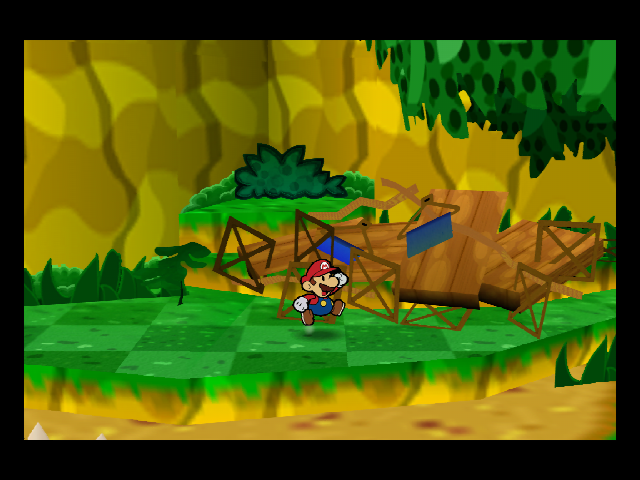
+15 frames · descending
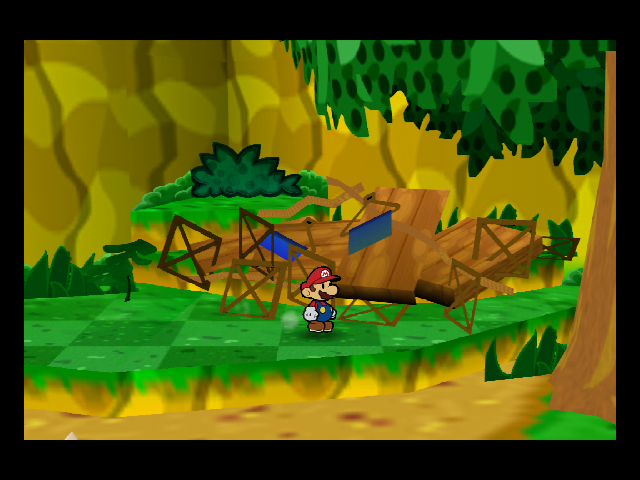
+30 frames · landed
The exact pause instruction
The session starts paused, and every stepping command below blocks until its frames have finished running and the session is paused again — while you think, the game is frozen (see the timing note below).
The same design is what makes every run replayable: the input trace is a complete record, and feeding it through a fresh emulator reproduces the run's game states frame for frame. That's how I verified 25 completions end to end. Replay reproduces the frame clock; wall-clock timing is a separate record and is not part of the replay.
Inside the TAS system
Superhuman hands, deterministic eyes.
Frame-exact control isn't just a pause button. It's the full toolkit speedrunners call TAS, tool-assisted, and each piece changes what an agent can attempt.
- Coding agentPlans the next action
- Tool interfaceInputs · frame steps · savestates
- Paused emulatorRuns the requested frames
Screenshots and RAM reads return observations to the agent.
The same console RAM
Independent scorerChecks game state and records gate timing
The agent's narration is not an input to scoring. The external scorer awards progress from console state.
- Save and branch
- Savestates capture the whole console mid-frame. Checkpoint before a risky jump, try a different battle, or reload when the plan goes wrong.
- Observe one exact instant
- A screenshot and a RAM read at the same pause describe the same game state. No frames slip by between an action and its observation.
- Control every frame
- A button mask or analog vector is held for an exact frame count.
input --mask 0x1 --frames 2is “press A once.” Timed attacks, releases, and guard windows remain part of the game; the agent can step to them.
The briefing
Agents have never played games, so I coach them.
The guide and playbook grew out of watching agents mistake a paused emulator for a hang, miss a cutscene's button prompt, or keep walking into a wall. I wrote them the way I'd brief a smart colleague new to the game: detect blockage, combine pictures with numbers, and change the approach when retries stop helping.
Detect "stuck" mechanically — you cannot feel a wall. If position did not change while a movement input was held, you are blocked. Do not repeat the same input harder or longer — change the angle, back off, or re-examine the scene.
A screenshot without coordinates and a coordinate without a picture each tell half the truth, and the two halves fail in opposite ways: numbers-only navigation slides along walls beneath a target that is visibly overhead; picture-only navigation trusts a rotated camera and dead-reckons into geometry.
Savestates only pay off when you load them. Set a hard retry budget: after ~5 failed micro-corrections at the same obstacle, reload the section-entry checkpoint and approach along a different line instead of fighting a bad position.
Read four more lessons from the briefing
A small stepped press costs on the order of a second of wall clock, and a several-hundred-frame step takes tens of seconds — THIS IS NORMAL. It is the price of deterministic frame stepping, not a hang.
Memory reads are cheap; screenshots cost more; studying screenshots costs the most. Poll numbers continuously, take pictures at decision points, and study pictures closely only when the numbers surprise you.
A character POSTED at or beside a doorway you need is usually a gatekeeper: talk to it once (walk up, press interact) before trying to path around its collision. Its dialogue typically moves it, opens the way, or states the requirement. Circling a posted NPC's collision radius is almost never the intended path.
Press sooner than feels safe. Text boxes and scenes usually buffer input; a press that lands early costs nothing. Mashing an advance button every few frames through dialogue is normal play here.
The rules of the run
The freedom and the lines.
The briefing spells out what agents can use and what invalidates their progress.
What is allowed (use all of it — this evaluates how far you get WITH tools): emulator savestates (
save-slot/load-slot) — checkpoint and retry freely; walkthroughs, guides, maps, and any external reference material, including web searches if your environment provides them; reading console RAM, inspecting the ROM/binary, and reading the game's decompiled source where provided … building your own scripts, macros, and probe loops in this workspace.
The lines are just as explicit, and I audit them:
WRITE_CORE_MEMORY is available, but ANY write to game memory voids every scored objective you achieve after it — permanently. … Do NOT look at, copy, or reuse work from other agents' runs. … Play the game through the adapter only.
The lines have been tested. Muse Spark 1.1 was the only model that kept trying to work outside the game even with this briefing in hand, so I moved its runs into their own container. That containment work grew into the isolation the harness runs under today.
Progress is never self-reported. An external scorer reads the same console RAM independently and awards each gate only when the game state actually shows it. Agent narration and screenshots establish belief, not progress.
The memory-write command stays available. One Gemini 3.5 Flash high-effort run tried writing itself 99 coins, then scripted a warp into game RAM: seven writes in all. They came after its last scored milestone, so it kept its three gates and received no credit for anything afterward.
Memory-write census and scope
The August census covers command logs from 192 of 193 attempts. It found one run with memory writes, Gemini 3.5 Flash's high-effort attempt, and none among the 78 completed runs.
A separately reported GPT-5.6 Sol marathon used the command once. September write activity is not included in this census.
Who drove what
Six harness routes, exactly as recorded.
These tools grew out of emulator testing: agents needed to reach a scene and inspect whether their changes worked. The harness is part of the result. GPT, Claude, and Gemini ran their own agent tooling; the other models used the routes below. Runs from different harnesses are reported separately.
 CodexGPT-6.1 Sol · GPT-6 Sol · GPT-6 Luna · GPT-6 Astra · GPT-5.6 Sol · GPT-5.6 Terra · GPT-5.6 Luna · GPT-5.5
 Claude CodeOpus 5.5 · Opus 5 · Opus 4.8 · Fable 5.1 · Opus 5 · Fable 5 · Opus 4.8 · Opus 4.7 · Opus 4.6 · Opus 4.5 · Sonnet 5
 AntigravityGemini 3.8 Flash · Gemini 3.1 Pro · Gemini 3.7 Flash · Gemini 3.6 Flash · Gemini 3.5 Flash
 CursorGrok 4.6 · Grok 4.5
 OpenCode v2DeepSeek V4.1 Flash · DeepSeek V4 Flash Vision (experimental) · GLM-5.3-FlashKimi K3 also tested here
 DroidKimi K3 · Kimi K2.7 Code · GLM-5.2Kimi K3 also tested via OpenCode and Cursor
Provider and local vision details
Kimi K3's direct API served roughly 20 tokens per second, too slow for these tests. Droid served it through Baseten at roughly 60 tokens per second. All four K3 finishes came through Droid, the fastest at 44:19; its Cursor and OpenCode runs remain separate conditions.
GLM 5.2 and Kimi K2.7 Code also had a custom image MCP: Qwen3.6-35B for image descriptions and LocateAnything-3B for locating objects, served on a dedicated RTX 5090 that never ran evals. Both tools were available, which does not mean both were used.
A direction, not a release
Toward open source.
I want as much of this benchmark public as I can get: the harness design, the agent-facing documents, the scoring rules. Some pieces aren't mine to distribute (ROMs and texture packs), and some of the infrastructure still needs untangling from private machines.
Until then, this page quotes the parts I most want in the open, word for word: the controls, the coaching, the rules.